Salesforce Apex Best Practices in 2026: What Actually Changes in an AI-First World
The rules of good Apex code haven't changed. But who enforces them — and how consistently — has changed completely.
Every Salesforce developer knows the rules. Bulkify your triggers. Avoid SOQL inside loops. Enforce CRUD and FLS. Maintain test coverage above 75%. Write one trigger per object. Document your classes. These Salesforce Apex best practices and coding standards 2026 teams still follow have been gospel for years — and they still are.
What's changed is not the rules — or the Salesforce coding standards 2026 teams are still expected to meet. It's who enforces them, how reliably they get enforced, and what happens when they're not. In 2026, the most effective Salesforce engineering teams aren't relying on developers to remember and apply these standards manually. They have AI doing it continuously — across every class, every trigger, every commit, in real time.
"Knowing Apex best practices and consistently enforcing them across a growing codebase are two very different things. AI closes that gap permanently."
The gap between knowing Salesforce Apex best practices and consistently applying them at scale has always been the real problem. Code reviews catch things. But they happen once per sprint, they depend on the reviewer's attention on a given day, and they miss what's already in production. AI enforcement changes that equation entirely.
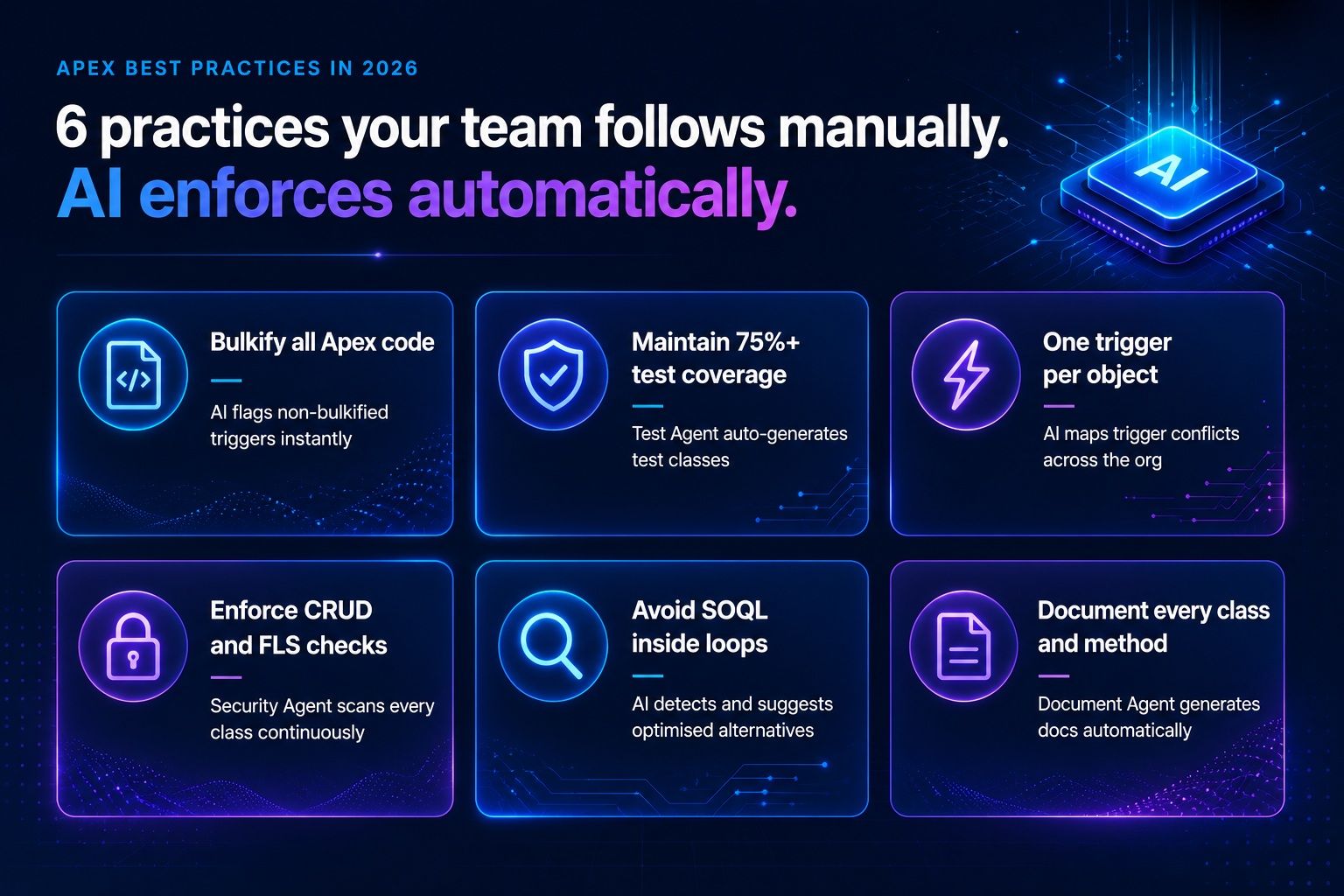
The 6 core Salesforce Apex best practices — and what AI does differently
1. Bulkify all Apex code
Non-bulkified Apex is one of the most common causes of governor limit exceptions in production. Every trigger should be written to handle collections, not single records. In a manual world this gets caught in code review — if the reviewer remembers to check, if the pull request is reviewed before it's merged, if the trigger was even flagged for review in the first place.
In an AI-first world, nCoder.ai's Code Agent reviews every Apex class against bulkification standards the moment it's written. No waiting for the sprint review. No relying on a developer having a good eye that week.
2. Avoid SOQL and DML inside loops
Following Salesforce governor limits best practices starts here — SOQL inside loops is the most classic Salesforce Apex performance mistake — and still one of the most common, because it's easy to write and only obviously wrong when you're thinking about governor limits at the same time as writing logic. AI doesn't forget. It flags every instance, explains why it's a problem, and suggests the refactored version inline.
3. Enforce CRUD and FLS checks
Salesforce Apex security best practices require every data operation to check that the running user has the correct Create, Read, Update, Delete, and Field Level Security permissions. This is one of the most frequently missed checks in real-world codebases — not because developers don't know they should do it, but because it's easy to skip when focused on the logic itself.
// Without security check — nCoder.ai flags this List<Account> accounts = [SELECT Id, Name FROM Account]; // With CRUD + FLS check — nCoder.ai suggests this if (Schema.sObjectType.Account.isAccessible()) { List<Account> accounts = [SELECT Id, Name FROM Account]; }
nCoder.ai's Security Agent scans every Apex class continuously for CRUD and FLS violations — not just at code review, but as an ongoing live scan of your entire org.
4. Maintain 75%+ test coverage — meaningfully
The 75% test coverage requirement is well known. What's less well known is how often teams hit 75% with tests that don't actually test anything meaningful — assertions missing, happy paths only, edge cases ignored. Salesforce test coverage best practices require tests that actually verify behaviour, not just lines executed.
nCoder.ai's Test Agent doesn't just generate tests to hit a coverage number. It generates tests that assert expected behaviour, cover bulk scenarios, and test both positive and negative paths — the kind of test classes that actually catch bugs before deployment.
5. One trigger per object
Multiple triggers on the same object create unpredictable execution order and make debugging nearly impossible. This is a classic Salesforce coding standard that gets violated gradually — one developer adds a trigger here, another adds one there, and before anyone notices the Account object has four triggers with overlapping logic.
AI maps your entire org's trigger structure and flags conflicts. Not just the ones added this sprint — the ones that have been quietly sitting there for three years.
6. Document every class and method
Documentation is the Salesforce Apex best practice most often acknowledged and least often followed. It requires time nobody has, discipline nobody enforces, and constant updates every time the code changes. With nCoder.ai's Document Agent, this is no longer a manual task — documentation is generated automatically from the code itself, kept current as changes happen, and queryable in plain English through Org 360.
See how nCoder.ai enforces Apex best practices automatically →
Manual code review vs. AI enforcement — the real difference
Manual Apex code review is valuable. But AI Salesforce code review is what makes standards stick at scale. It should still happen. But it is not a substitute for continuous enforcement — and the best Salesforce engineering teams in 2026 don't treat it as one. They use AI for the continuous layer and human review for the judgement layer.
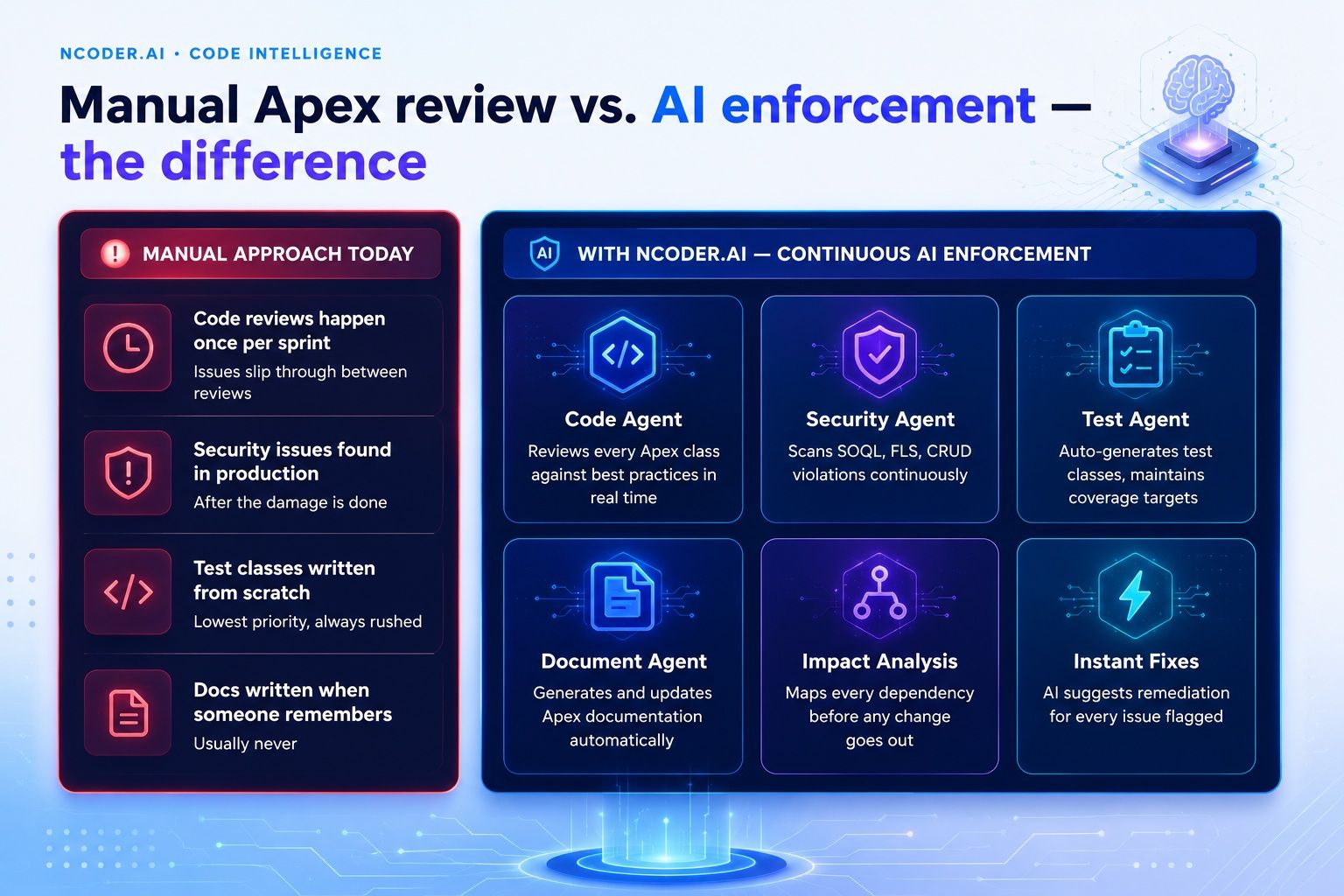
The difference isn't just efficiency. It's consistency. A human reviewer has a good day and a bad day. An AI code review runs at the same standard every time, across every class, regardless of how complex the sprint is or how many pull requests are queued. Apex code quality Salesforce teams achieve in an AI-first world isn't about replacing good developers — it's about giving them a system that never forgets the rules they already know.
Reviews every Apex class against best practices in real time. Bulkification, naming standards, logic complexity — all checked continuously.
Scans for SOQL injection, CRUD violations, FLS gaps, hardcoded credentials, and deprecated API usage — with fix suggestions for every issue flagged.
Generates meaningful test classes automatically, maintains coverage targets, and covers bulk and negative scenarios your developers don't have time to write manually.
Generates and updates Apex documentation as code changes. Every class documented. Always current. Zero effort from your team.
What are Salesforce Apex best practices in 2026?The core Salesforce Apex best practices remain the same — bulkify all code, avoid SOQL and DML inside loops, enforce CRUD and FLS checks, maintain meaningful test coverage above 75%, use one trigger per object, and document every class and method. What's changed in 2026 is how teams enforce these standards. AI-powered platforms like nCoder.ai now enforce Apex best practices continuously and automatically — catching violations in real time rather than waiting for periodic manual code reviews.
nCoder.ai reviews, scans, tests, and documents your Apex code continuously — so your standards are enforced on every class, every commit, every sprint.
Explore nCoder.ai →Salesforce Apex best practices haven't changed. What's changed is the expectation — that a modern Salesforce engineering team will enforce them consistently, at scale, across every class in every org, without relying on memory or manual review cycles. nCoder.ai is how you meet that expectation.