SDLC Automation Explained: From Jira Ticket to Production
Introduction
On Monday morning, a product manager creates a Jira ticket: "Add a promo code field to checkout." It looks like a two-day job.
On Tuesday, the developer spends the morning asking around: which services touch checkout, and who owns the pricing API? On Wednesday, the code gets written in an afternoon. On Thursday, it waits for tests and a reviewer. Nobody updates the docs. On Friday, the deployment pipeline flags a conflict with another change. The ticket ships the following week.
The actual coding took a few hours. Everything around it took eight days.
That's the gap SDLC automation is meant to close. Not just writing code faster, but carrying a piece of work from ticket to production without losing context at every handoff. This guide follows one ticket through the whole journey, shows what can be automated at each step, and explains where people still need to stay in charge.
What is SDLC automation?
The software development lifecycle (SDLC) is every step a change goes through: from the moment someone asks for it, to planning, building, testing, documenting and releasing it into production.
SDLC automation means using software, and increasingly AI agents, to carry work through those steps with less manual effort. It's not one tool. It's a connected flow where each step hands the next one everything it needs: what the change is, what it touches, what was decided and why.
It's worth being clear about what it isn't. A coding assistant on its own isn't SDLC automation, and neither is a CI/CD pipeline on its own. Both are important, but each covers one stage. End-to-end SDLC automation is about the whole journey, and especially the gaps between stages, which is where most time actually disappears.
The real problem: handoffs, not code
Here's a number that surprises most people outside engineering. In Atlassian's 2025 State of Developer Experience report, developers said they spend only 16% of their time actually coding. Half of them lose more than 10 hours a week to inefficiencies, and the biggest time-wasters are finding information, getting to grips with new technology, and switching between tools.
The 2026 edition tells the same story: finding information still tops the list, followed by meetings and context switching. And in a separate survey, 87% of engineers said switching between tools hurts their productivity, while 62% said their tools aren't properly integrated into their workflow (The New Stack).
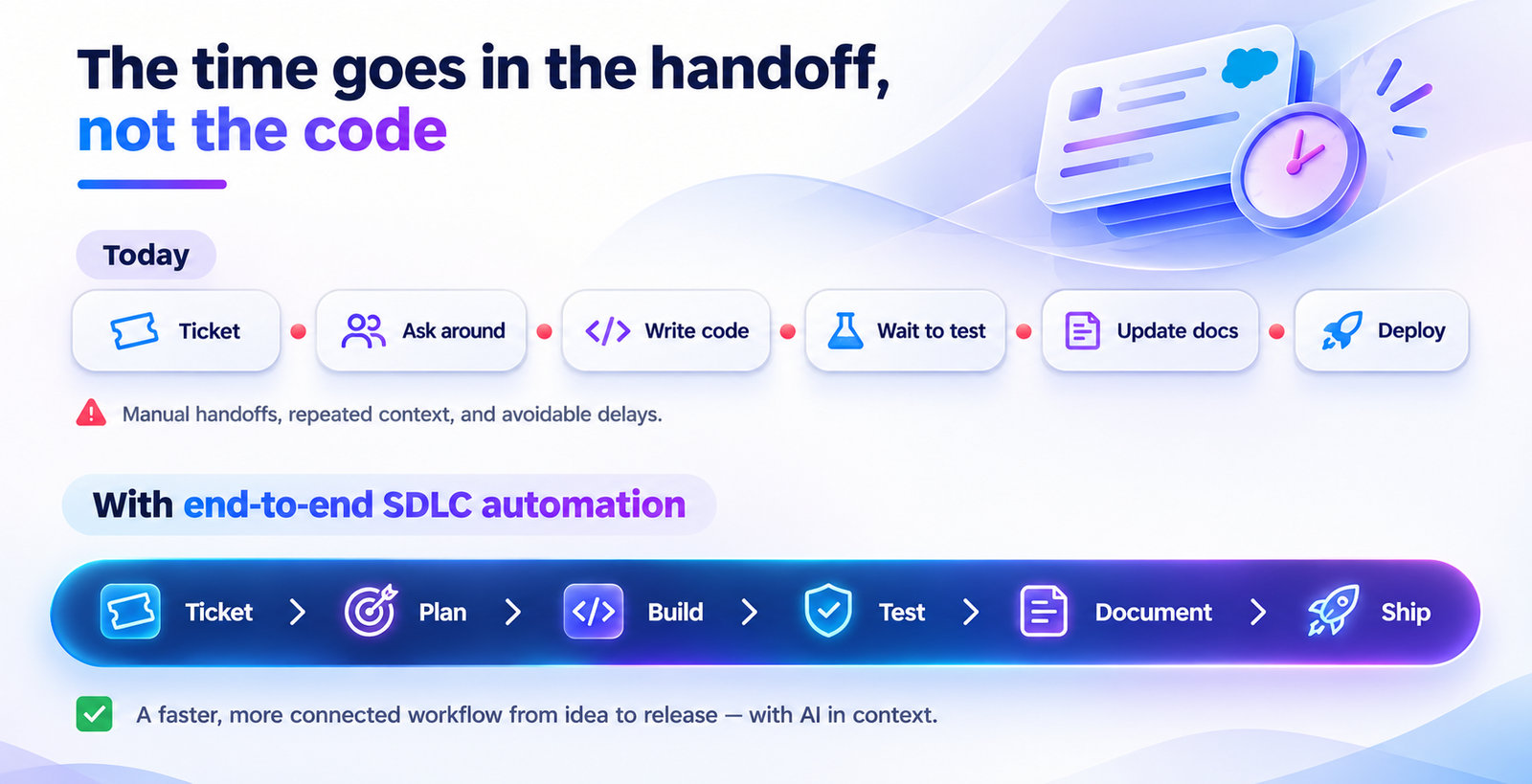
In other words, the slow part of shipping software isn't typing code. It's every moment someone has to stop, find out what's going on, and rebuild the context the previous step already had. That's also why coding assistants alone haven't fixed delivery speed: they speed up the 16%, and leave the handoffs untouched.
Follow one ticket from Jira to production
Let's go back to our promo code ticket and walk it through an automated SDLC, one stage at a time.
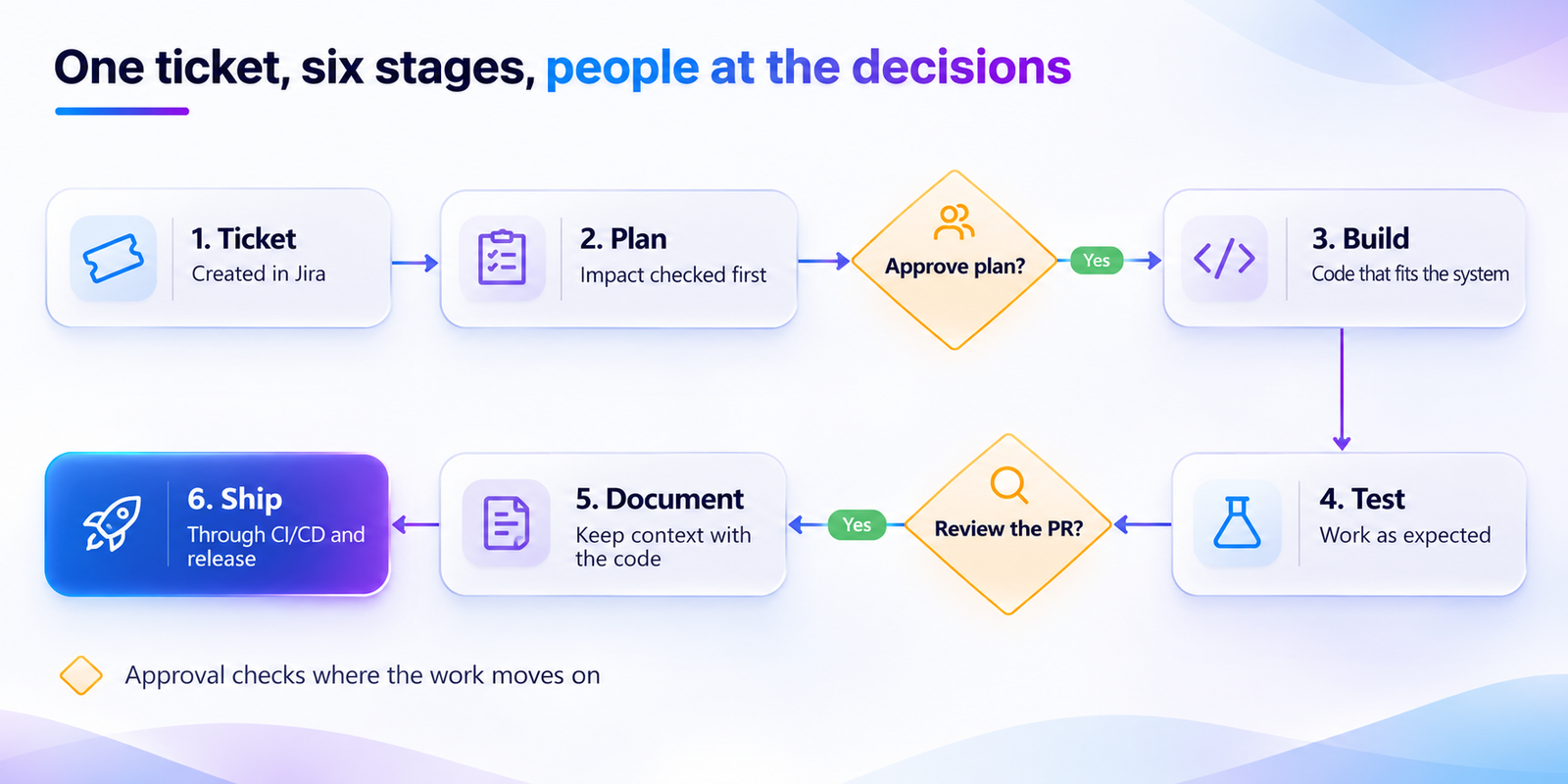
1. Ticket: the request arrives
Work starts where it already lives: in Jira. In an automated flow, the ticket isn't just a title and a description. It becomes the starting point the rest of the journey keeps referring back to, so nobody has to re-explain the request three days later.
2. Plan: understand the impact before writing a line
This is the step most teams skip, and pay for later. Before any code is written, the system works out what the change will touch: which services, APIs, data fields and tests are connected to checkout. In other words, it answers "what happens if I change this?" up front, and turns that into a plan a person can approve.
3. Build: code that fits the system
With a plan and real context about the codebase, an AI agent drafts the code. Because it knows how the system is built, it can follow existing patterns and naming instead of inventing its own. The developer stays in charge, reviewing and adjusting rather than starting from a blank file.
4. Test: run automatically, not "when QA is free"
Tests are generated or updated alongside the code and run straight away. Problems show up in minutes, while the change is still fresh in everyone's mind, not days later in someone else's queue.
5. Document: docs that update themselves
Documentation is the step everyone means to do and nobody does. In an automated flow, it's updated as part of the change itself, so the next person who touches checkout can see what changed and why.
6. Ship: through the pipeline you already trust
Finally, the change moves through Git and your CI/CD pipeline into production, with the same checks and approvals as any other release. Automation doesn't replace your release process; it hands it a change that's already planned, tested and documented.
What gets automated, and what stays human
"Automate the entire SDLC" can sound like "remove the people." It shouldn't mean that, and in practice it doesn't work that way.
AI is good at carrying work and context from step to step. It's much less reliable at deciding what should be built. Atlassian's 2026 research found 65% of developers already spend time correcting AI-generated work that missed the original intent. More automation without clear human checkpoints just produces wrong work faster.
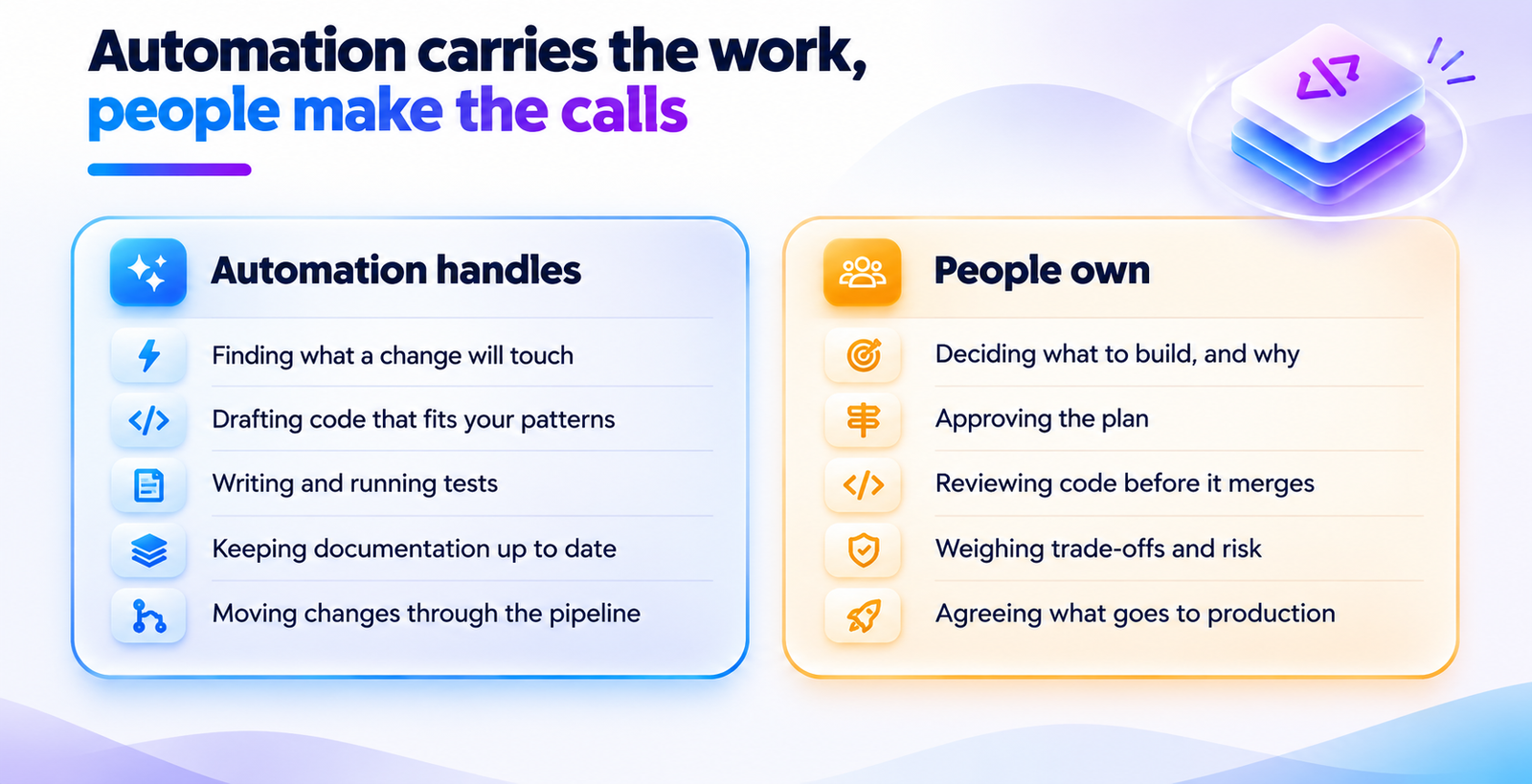
The healthiest setup is simple to describe: let automation do the carrying, and put people at the moments that need judgement. Approving a plan, reviewing a pull request and signing off a release take minutes when the work arrives already explained, tested and documented.
What to look for in an SDLC automation platform
If you're evaluating tools, these six questions separate real end-to-end automation from a coding assistant with a new label.
- Does it start where your work starts? If your requests live in Jira, the platform should pick them up from Jira, not ask you to copy them somewhere else.
- Does it understand your system before it changes it? Look for impact analysis that shows what a change touches across services, APIs and data, before any code is written.
- Does it cover the whole journey? Plan, build, test, document and ship, not just one of them.
- Does it fit the technologies you already use? Most real systems mix several languages and platforms. A tool that only understands one leaves gaps.
- Does it plug into your existing pipeline? It should hand work to your Git and CI/CD setup, not replace the release process your team already trusts.
- Where do people stay in control? You should be able to see, and set, the points where a person approves the plan, the code and the release.
Where nCoder.ai fits
nCoder.ai is built to automate the entire software development lifecycle, from the ticket to production, in one platform.
- It starts in Jira. Work begins where your team already plans it.
- It connects your stack. nCoder works across around 50 technologies, from full-stack and TypeScript projects to Salesforce, and flows downstream into Git and your CI/CD pipelines.
- It understands your system first. Ask "what happens if I change this?" and see what a change touches in about a second, backed by a 360° view of how your system connects and documentation that's ready out of the box.
- It's built on Graph RAG. nCoder maps your system as a knowledge graph, so AI works from the relevant context instead of guessing, which also keeps token use efficient.
- It works where you work. Use nCoder in the web workspace or inside VS Code.
- It comes with people, not just software. Every enterprise story is different, so nCoder's Forward Deployed Engineers work alongside your team to fit the platform to how you actually build.
Back to the promo code ticket: instead of eight days of asking around and waiting in queues, the change arrives at each human checkpoint already planned, tested and documented. The people stay in charge. The waiting disappears.
FAQs
What is SDLC automation? It's using software and AI agents to carry work through every stage of the software development lifecycle (planning, building, testing, documenting and releasing) with less manual effort and fewer handoffs.
Is SDLC automation the same as CI/CD? No. CI/CD automates the build-and-release end of the lifecycle. End-to-end SDLC automation also covers what happens before that: understanding the request, planning the change, writing the code and keeping docs current.
Will SDLC automation replace developers? No. It removes the waiting and the hunting for context, so developers spend more time on the decisions and design work that need them. People still approve plans, review code and sign off releases.
How is it different from an AI coding assistant? A coding assistant helps write code, which is only a small part of a developer's week. SDLC automation connects the whole journey, including the handoffs where most time is actually lost.
Where should a team start? Pick one common type of ticket, walk it through the six stages, and look for where it waits. That's usually where automation pays off first.
Conclusion
The promo code ticket didn't take eight days because the code was hard. It took eight days because every step had to rebuild what the step before it already knew. That's the real promise of end-to-end SDLC automation: not a faster keyboard, but a flow where context travels with the work, people step in at the moments that need judgement, and a ticket moves from Jira to production without getting stuck in between. Get that right, and "two days" might finally mean two days.
See one ticket go all the way through
nCoder.ai automates the software development lifecycle from ticket to production, with your team in control at every decision.
Book a call or request a demo to see it on your own codebase.
Sources
- State of Developer Experience 2025 – Atlassian
- Atlassian DevEx 2026 findings – InfoQ
- Survey: Engineers Want to Code, But Spend All Day on Tech Debt – The New Stack