Winter '27 Is Rolling Out. What Will It Break in Your Org?
Every Salesforce release arrives with a long list of shiny features and one quiet worry: what did this just do to our org? The Winter '27 release is rolling out now, and the honest answer is that most of it is good news. But a few changes deserve a look before they reach production.
This guide walks through what's new, what could cause trouble, and a simple checklist you can follow this week. No jargon, no panic.
The short version
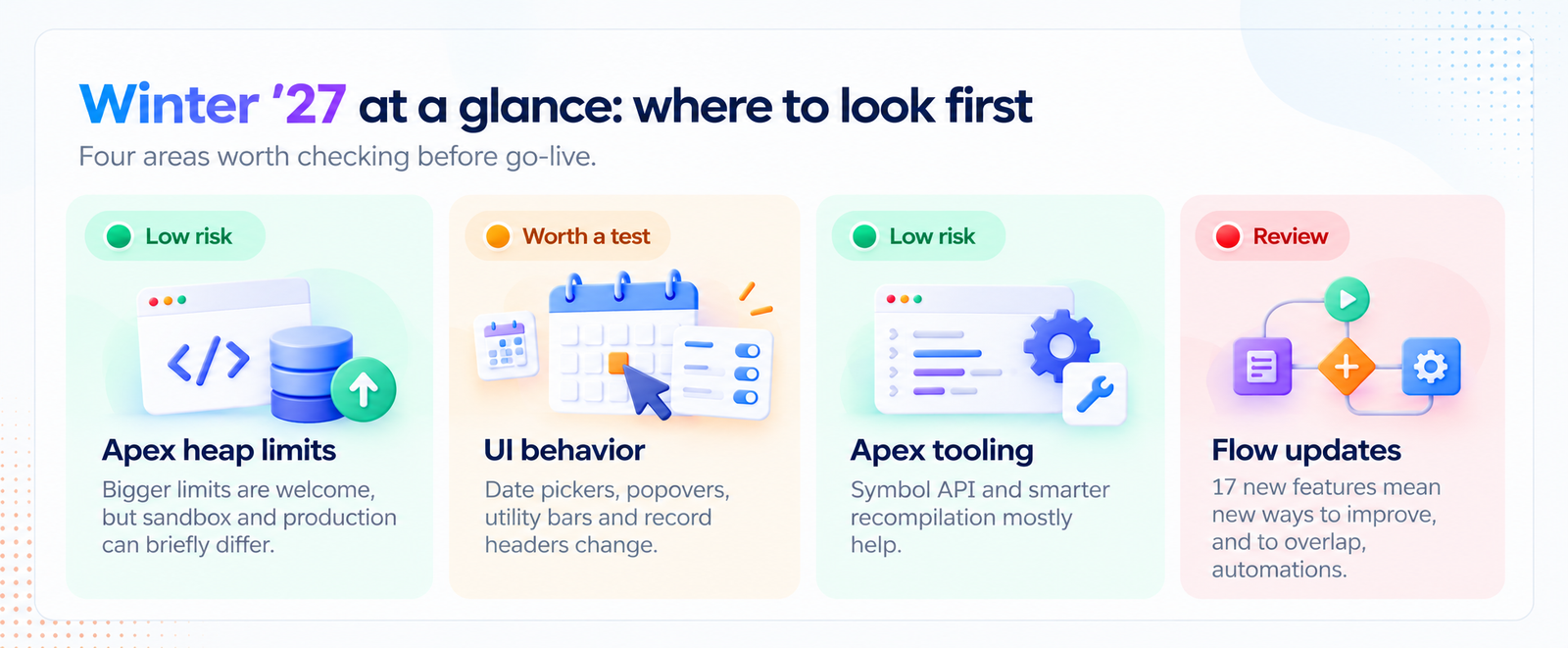
Winter '27 isn't built around one giant headline feature. It's a stack of practical upgrades for developers, admins and Flow builders. Because it's mostly additive, true "breakage" is rare. The risk usually hides in the gaps between sandbox and production, and between a generic release note and your very specific org.
1. The Apex heap limit increase: good news, with one catch
Developers have wanted this for years. In Winter '27, the synchronous Apex heap limit goes from 6 MB to 10 MB, and the asynchronous limit goes from 12 MB to 25 MB. That's real breathing room for code that processes larger datasets.
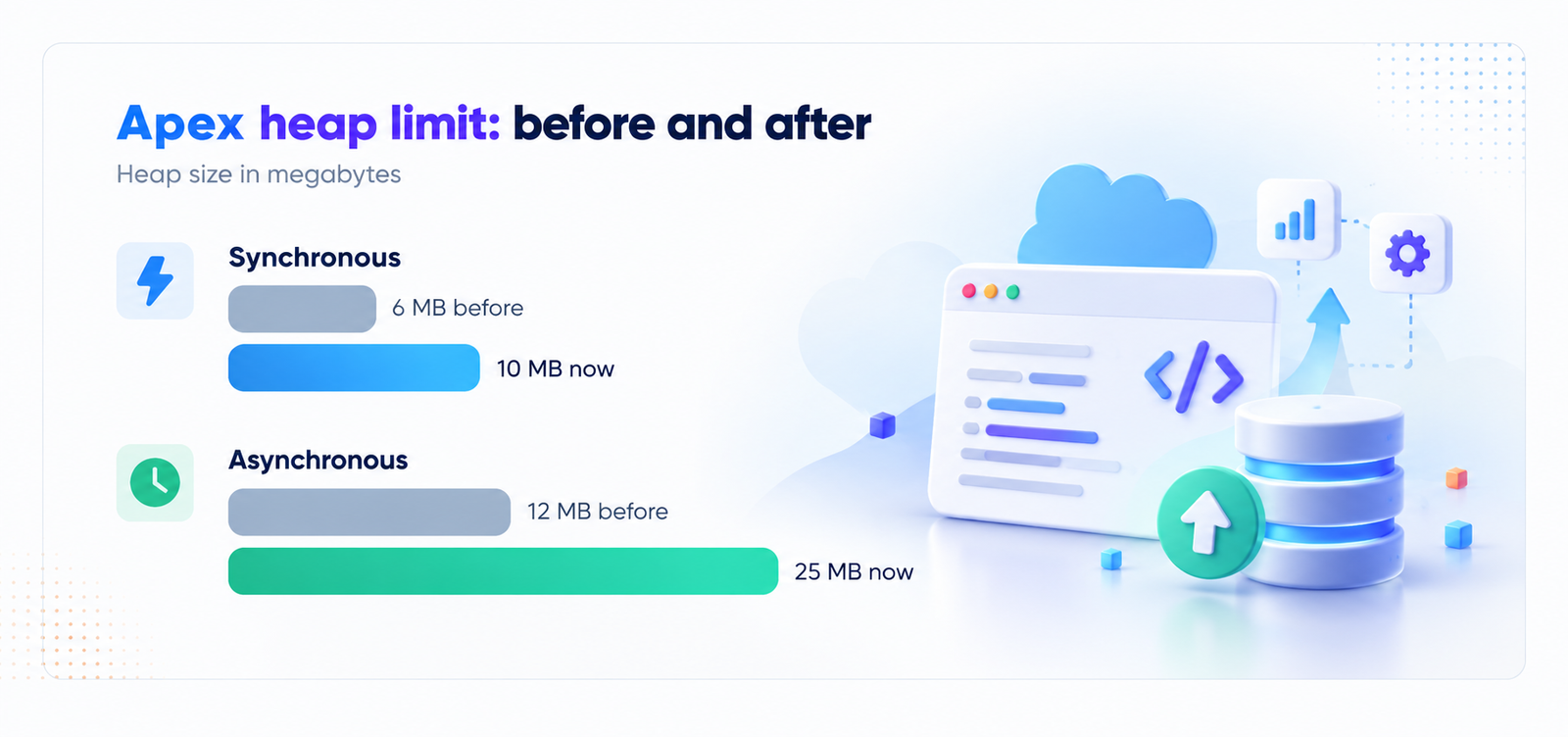
Here's the catch. A Winter '27 sandbox may run on the new limits while your production org is still on the old ones. Code that passes every test in the sandbox could hit a heap error in production. Salesforce added a setting to enforce the Summer '26 heap limit so you can keep working in a Winter '27 sandbox and still deploy safely. If you move code between orgs on different release timelines, turn it on and know where each org stands.
2. UI behavior changes: the ones people forget
Salesforce is adjusting how date pickers, popovers, bottom utility bars and record headers behave. Nothing here is dramatic, but small UI shifts are exactly what trips up custom Lightning components, saved screenshots in training material, and automated UI tests that look for an element in a specific place.
If your team runs UI regression tests or has heavily customized record pages, click through your top five user journeys in the preview sandbox. Ten minutes of clicking can save an awkward Monday morning.
3. Apex and developer tooling: mostly upgrades
This is where Winter '27 shines for developers:
- Apex Symbol API. A Tooling API resource that returns structured details about Apex types. It helps IDEs and AI coding tools understand your code far better.
- Faster recompilation. Salesforce can focus on invalid Apex classes and triggers instead of recompiling everything, which helps large orgs.
- Real HTTP callouts in integration tests. Still in Developer Preview and limited to scratch orgs, so don't build your pipeline on it yet.
- SOQL FORMULA() function. Handy, but currently a beta feature. Try it in a sandbox, not production.
- Claude Code plugin for Salesforce development. It brings org context into the tool through MCP servers.
A small habit worth keeping: treat "beta" and "Developer Preview" as a signal to experiment, never to depend on.
4. Flow: more power, more to keep track of
Winter '27 brings 17 new Flow features. They're mostly improvements to building, debugging and scaling automation. The risk isn't that anything breaks. It's that teams start adopting new features while older flows, triggers and Apex still act on the same objects. More automation touching the same records means more chances for surprises like double updates and recursion.
Why release notes alone won't tell you what breaks
Release notes describe Salesforce, not your org. They can tell you a behavior is changing. They can't tell you which of your 400 flows, 1,200 Apex classes or custom components rely on it. That connection is what takes days of manual digging, and the clock is short: the sandbox preview opens roughly four to five weeks before each release. That's your whole window.
Your Winter '27 readiness checklist
Five steps to a calm release week
Do these in order, in a sandbox first
Find your rollout date
Check your instance on Salesforce Trust so you know when production changes.
Read the notes against your org
Highlight only the items that touch Apex, Flow, LWC and your UI customizations.
Compare sandbox and production
Note which release each org is on, and set the heap limit option if they differ.
Run your top user journeys
Test the critical paths and any UI automation in the preview sandbox.
Record what you found
Keep a short impact log as evidence for audits and for the next release.
How nCoder takes the guesswork out
This is the exact job nCoder's release analysis was built for. Upload the Salesforce release notes, and nCoder cross-references every change against your org's metadata, Apex, flows and packaged components. You get an impact report that sorts findings into Breaking, Deprecated, Review, Improvement and OK, so you start with the items that matter instead of reading everything.
Because nCoder builds a live knowledge graph of your org, it can trace how one change ripples across dependencies. That means fewer surprises on go-live day and a clear record of what you checked.
Quick answers
When does Winter '27 reach my org?
It depends on your instance. Check Salesforce Trust for your date, and use the sandbox preview before then.
Will the heap limit increase break my code?
Usually not. The risk is a mismatch between a sandbox on new limits and production on old ones, so test with that in mind.
What's the fastest way to check my own org?
Match the release notes against your Apex, flows and customizations in a preview sandbox, or use a release impact tool to do the cross-referencing for you.
Connect one org and get a release impact report in your first week, with a dedicated Forward Deployment Engineer and a 30-day trial on your own metadata.
Start your free 30-day trial