AI Tools for Salesforce Explained: The 5 Types and Which One You Actually Need
Introduction
A year ago, choosing an AI tool for Salesforce was simple: there weren't many. Today, your inbox has a new one every week. They all say "AI-powered." They all say "agents." Most say "context-aware." And somehow they all claim to save your team hours.
The trouble is that they're not competing for the same job. Some write code. Some guard your releases. Some help admins. Some explain how your org works. Some talk to your customers. Comparing them as if they were the same thing is like comparing a hammer, a tape measure and a blueprint and asking which one builds the house.
This guide sorts AI tools for Salesforce into five clear types, explains what each is genuinely good at and where it falls short, and helps you work out which ones your team actually needs.
Why choosing Salesforce AI tools feels so confusing
Three things make this harder than it should be.
Everyone uses the same words. Copado calls its Agentia agents context-aware. Elements.cloud offers a metadata graph your coding agents can query. Gearset has launched its own agent, Cam. Salesforce itself ships Agentforce for business users and Agentforce Vibes for developers. The vocabulary overlaps even when the products don't.
Different people buy for different reasons. A developer wants to write Apex faster. A release manager wants fewer failed deployments. An admin wants fewer tickets. An architect wants to understand the org. Each one hears "AI tool" and pictures something different.
Most teams end up with several. That's not automatically a problem, as long as you know why each one is there. (If your team already has too many, we wrote about the tool consolidation problem separately.)
The fix is to stop asking "which AI tool is best?" and start asking "which type of job do I need done?"
The 5 types of AI tools for Salesforce
1. AI coding assistants
What they do: help developers write, explain and refactor code inside an editor or terminal.
Examples: Claude Code (now with a Salesforce Development plugin that adds org context through hosted MCP servers), Agentforce Vibes, Cursor and GitHub Copilot.
Great at: Apex, LWC, tests and boilerplate, fast. Developers love them.
Watch out for: they usually work one file or one project at a time. Unless they're connected to your org's metadata, they can't see the flow, field or integration that your new code will collide with, and they can be confidently wrong.
2. DevOps and release AI
What they do: add AI to the pipeline that moves changes from sandbox to production: code reviews, conflict resolution, testing and deployment.
Examples: Gearset (Code Reviews, Org Intelligence and its Cam agent), Copado (Agentia) and AutoRABIT.
Great at: catching problems before they ship and keeping releases governed, whoever or whatever wrote the change.
Watch out for: they mostly act at review and deployment time. By then, the design decision is already made.
3. Admin automation agents
What they do: let admins describe a configuration task in plain English (a new field, a flow, a user change) and have an agent carry it out.
Examples: tools like Clientell focus on this space.
Great at: clearing the queue of small, repetitive admin requests.
Watch out for: speed without visibility. A quick config change can still break something downstream, so impact checks and review matter just as much.
4. Org intelligence and documentation
What they do: read your org's metadata, map how everything connects, and explain it: dependencies, impact analysis, technical debt and documentation.
Examples: Elements.cloud and Sweep, plus org intelligence features inside Gearset and Copado.
Great at: answering "what is this, what depends on it, and what breaks if we change it?", which is the context every other AI tool needs.
Watch out for: some stop at analysis. One comparison notes Sweep, for example, stops short of execution, so you still need something else to make the change.
5. Agentforce and business agents
What they do: Salesforce's own AI agents work on your data and business processes: answering customers, qualifying leads, updating records.
Examples: Agentforce agents for service, sales and commerce, and the wider Agentforce platform.
Great at: serving customers and employees directly, inside Salesforce and beyond it.
Watch out for: these aren't development tools. Building and changing agents is itself development work, with the same need for testing, governance and impact checks as anything else in your org.
Where each type fits in your delivery lifecycle
Another way to see the difference: map each type onto the stages a Salesforce change goes through, from planning it to running it in production.
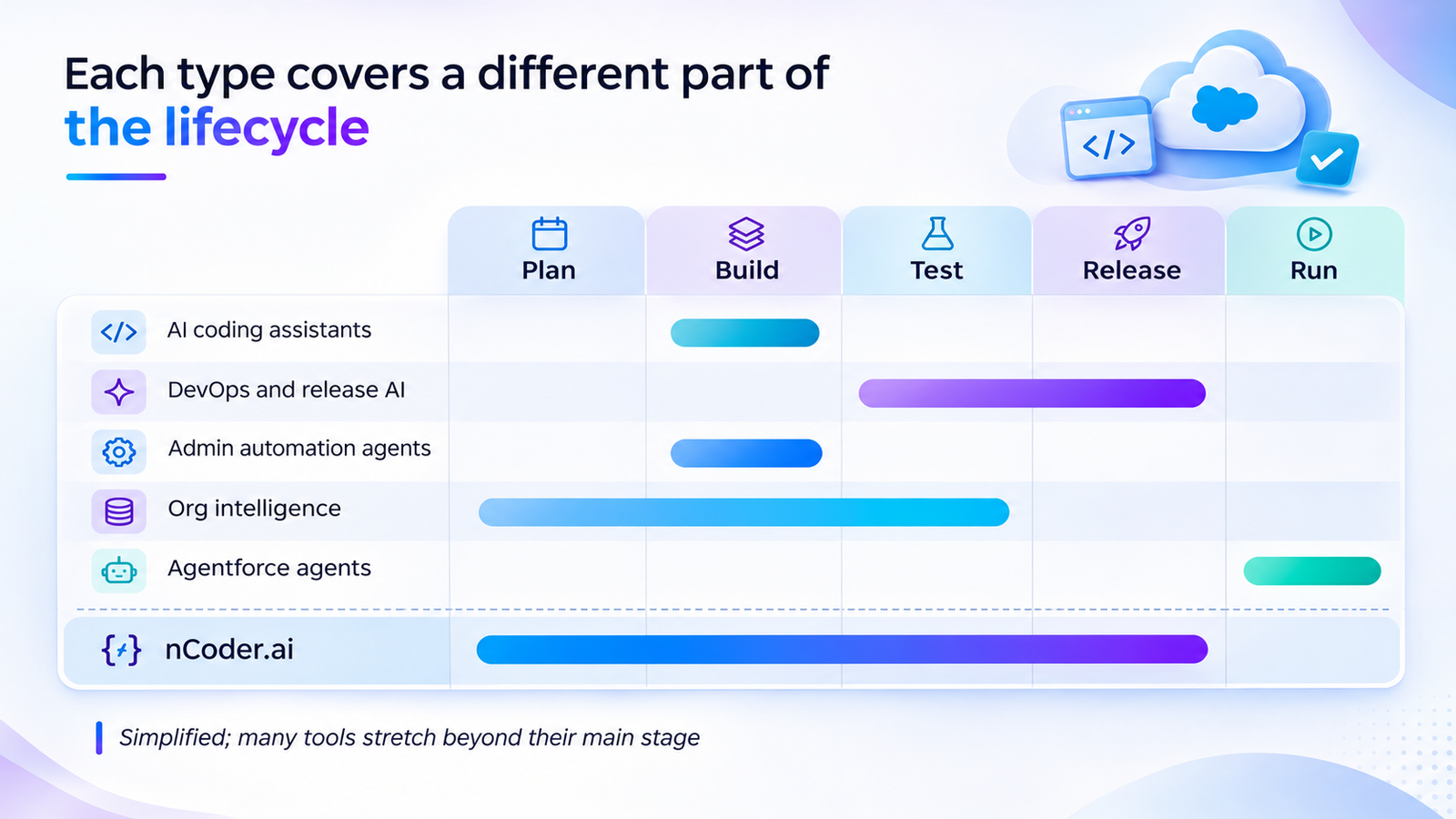
Two things stand out. First, there's a lot of crowding in Build, where most of the excitement (and marketing) is. Second, Plan is thin. Yet planning is where you decide what to change and what it will affect, and it's where a wrong assumption costs the most later. That's why org context matters so much, which we'll come back to below.
Which one do you actually need?
The quickest way to choose is to listen to what your team keeps complaining about. Each complaint points to a type.
A few practical tips before you sign anything:
- Run a pilot on your messiest org, not a demo org. Every tool looks brilliant on clean sample data.
- Ask what the tool can actually see. One file? One project? Your whole org's metadata? The answer predicts how often it will be confidently wrong.
- Ask who reviews what it does. Speed is only useful if changes still go through testing and review. Our post on running a Salesforce Center of Excellence covers how to keep AI-made changes governed.
- Check how it handles your data. Know whether it reads metadata, records, or both, and where that information goes.
If you're an architect evaluating tools, we also put together six questions to ask before you rely on any AI tool.
How the types fit together, and where nCoder.ai fits
Here's the part most comparisons miss. These tools aren't really competing layers. They stack, and they all depend on the same thing: an accurate picture of your org.
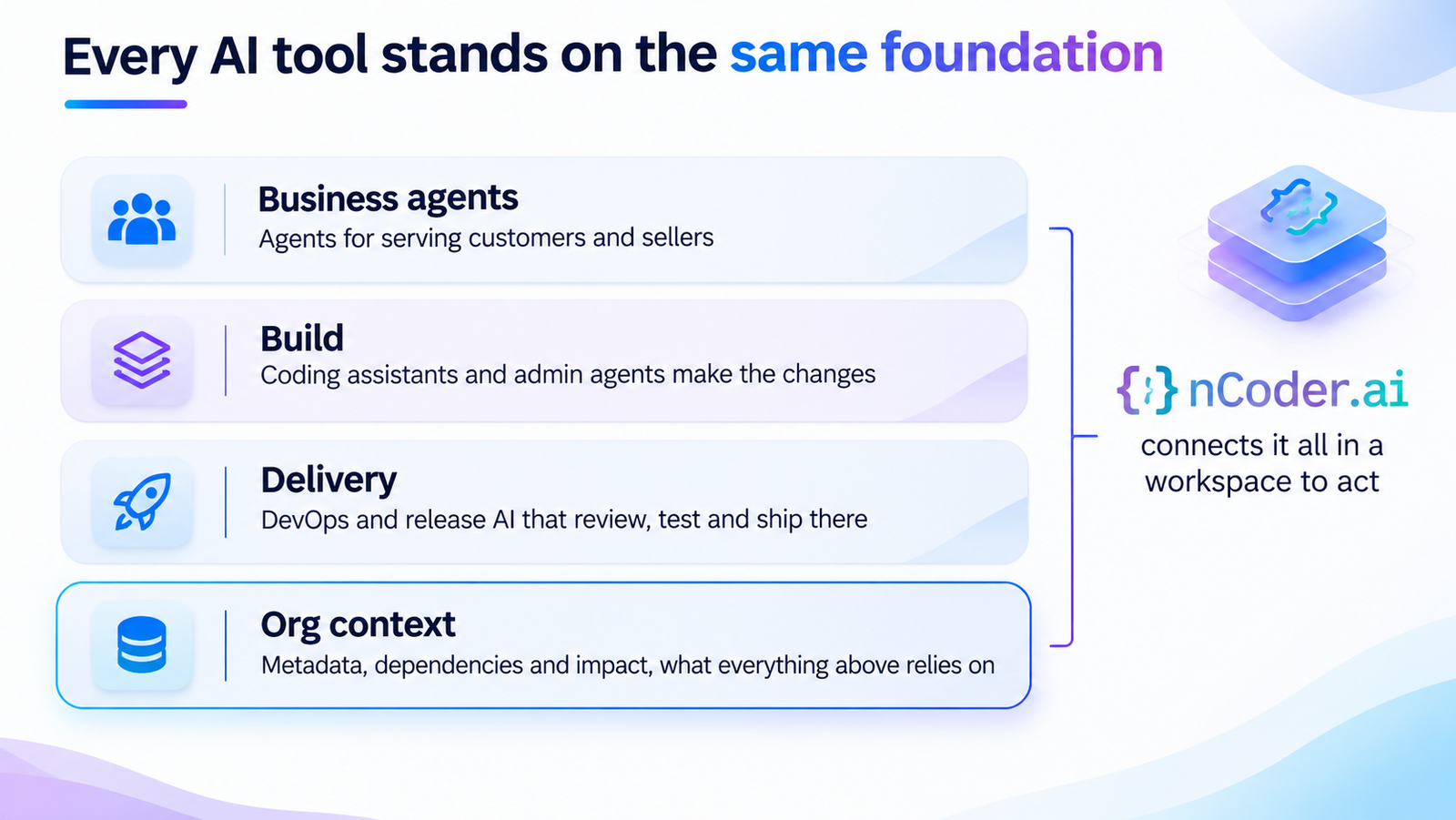
A coding assistant that can't see your org writes code that doesn't fit it. A DevOps tool can only catch what it knows to check. An admin agent can make a change in seconds without knowing what else relies on that field. Even Agentforce agents are only as reliable as the org they run on. That's why Salesforce's own developers are wiring org context into coding tools, and why we explain Graph RAG as the foundation for accurate AI.
This is where nCoder.ai fits. It's an AI workspace built only for Salesforce teams, and it starts with the foundation:
- Org context first. nCoder connects through Salesforce OAuth and maps your objects, fields, Apex, flows, LWC and permissions into Org 360, a knowledge graph with dependencies and blast radius.
- A workspace to act on it. Weave, nCoder's chat workspace, answers questions and fixes code from your real metadata. Ready-made agents and migration templates handle work like Apex quality fixes and moving Aura or Visualforce to LWC.
- Test and ship. Plain-English tests run in a live browser, including as another user, and changes deploy to Salesforce or GitHub, with tools like Jira connected.
- Model-agnostic. nCoder works with models from Anthropic, OpenAI, Google, Meta and others, or your own.
And it sits alongside the tools you may already have. Agentforce works on your Salesforce data; nCoder works on the metadata and code layer. Your coding assistant and DevOps pipeline still have their jobs; nCoder gives them, and your team, the context to do those jobs well.
FAQs
What are the best AI tools for Salesforce? There isn't one best tool, because they do different jobs. Start by naming your biggest problem (slow builds, broken releases, admin backlog, or not understanding your org) and choose the type that solves it first.
Is Agentforce an AI tool for Salesforce developers? Agentforce agents mainly serve customers and employees by working on Salesforce data. For developers, Salesforce offers Agentforce Vibes, a separate AI coding tool that works inside the IDE.
Can I use Claude Code or Cursor for Salesforce development? Yes. Both are popular with Salesforce developers. They work best when connected to your org's metadata, for example through Salesforce's MCP servers or an org intelligence platform, so they're not guessing about your fields and automation.
Do I need more than one AI tool for Salesforce? Most teams end up with two or three types, such as a coding assistant, a DevOps tool and something that provides org context. What matters is that each one has a clear job and they share an accurate picture of your org.
Where does nCoder.ai fit? nCoder.ai provides the org context layer (Org 360) plus a workspace to act on it: understanding, fixing, testing and deploying changes. It works alongside Agentforce and your existing development and DevOps tools.
Conclusion
The market for AI tools for Salesforce isn't going to get quieter. But it gets a lot less confusing once you stop comparing everything to everything. Coding assistants build. DevOps AI protects your releases. Admin agents clear the queue. Agentforce serves your customers. And underneath all of them sits the one thing they can't do without: an accurate, current picture of your org. Get that foundation right, choose each tool for the job it's actually built for, and AI stops being a pile of subscriptions and starts being a team that works together.
See your org the way your AI tools need to
nCoder.ai maps your entire Salesforce org and gives your team, and every AI tool you use, the context to build, test and ship with confidence.
Book a call or request a demo to see it on your own org.
Sources
- Copado releases Agentia – SiliconANGLE
- Elements.cloud homepage
- Gearset launches Cam – Cambridge Network
- Salesforce Launches Agentforce Vibes – Salesforce Ben
- Top 10 Salesforce Winter '27 Features for Developers – Salesforce Ben
- Best AI tools for Salesforce 2026 – Clientell