Salesforce Center of Excellence: How to Govern Changes When AI Writes the Code
Introduction
It's Monday morning, and you're running the weekly change review for your Salesforce org. The list is longer than usual. A new Apex class for discount approvals. Two updated flows. A permission set change. A test class with suspiciously perfect coverage.
You ask who wrote the Apex class. The developer pauses, then says, "Well... Claude did. I reviewed it." The flow changes came from Agentforce Vibes. The test class was generated in about forty seconds.
Nobody did anything wrong. But you realize your Salesforce Center of Excellence was designed for a world where every change had a human author who understood it line by line. That world is gone. AI coding assistants are now close to universal, with one 2026 industry study putting adoption at 97% of enterprise teams. This guide covers how to run a CoE that keeps up, and where nCoder.ai fits in.
What a Salesforce CoE is really for
A Salesforce Center of Excellence, or CoE, is the group that keeps your org healthy as it grows. It sets standards, approves changes, plans releases, manages risk and helps teams get more value from the platform. Salesforce's own guidance says a CoE needs executive backing and real authority to make decisions, not just an advisory role.
None of that goes away with AI. What changes is the volume and the source. When changes arrive faster, and some of them were never fully understood by the person submitting them, a CoE built on manual reviews and wiki pages starts to buckle.
What changes when AI starts writing your changes
The CoE's job stays the same: protect the org while helping teams move. But almost every assumption behind how it does that job shifts.
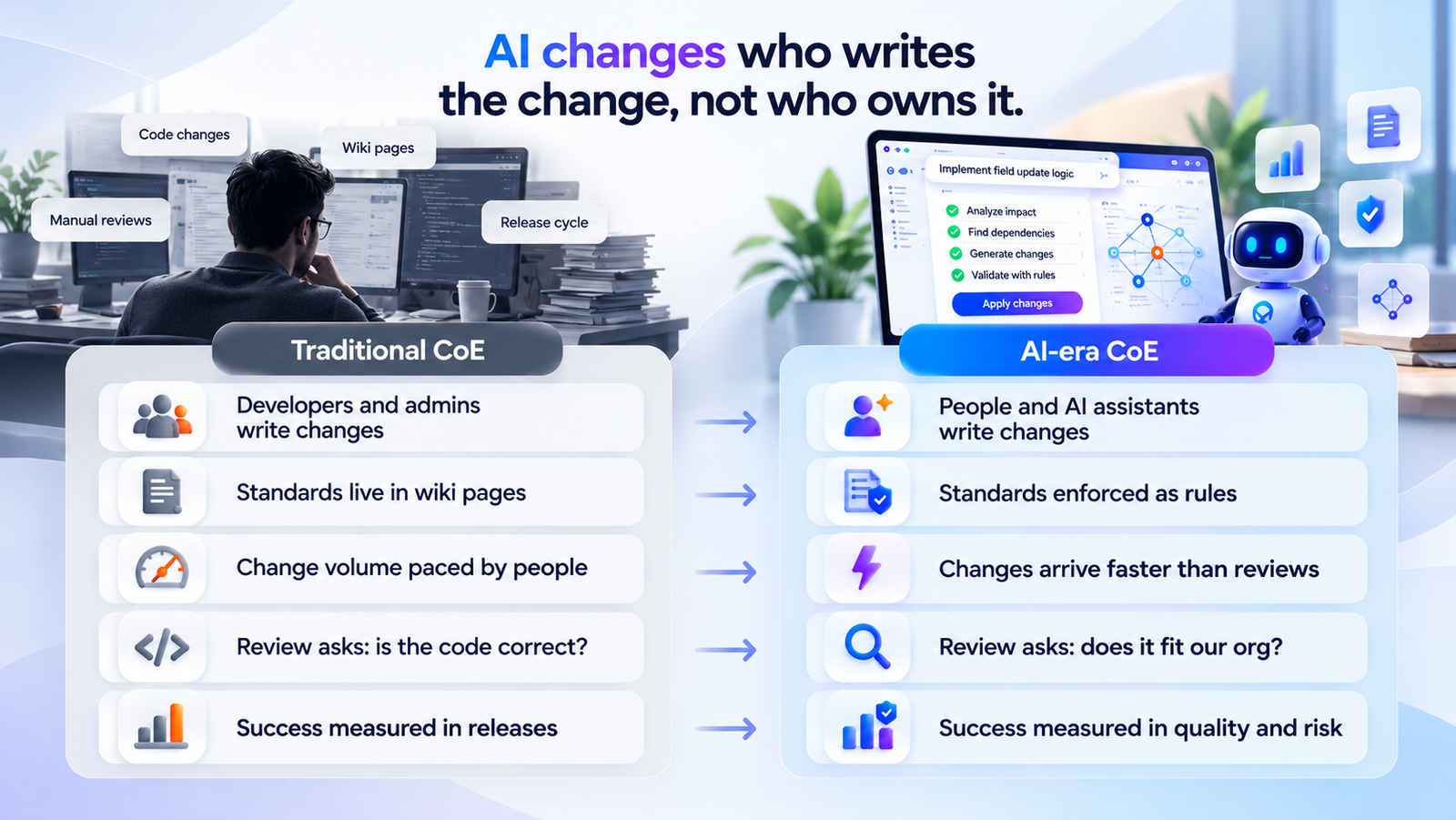
The biggest shift is the review question. AI-generated Apex usually compiles, passes tests and looks clean. The real risk is that it doesn't fit your org: it duplicates logic that already exists, ignores a sharing rule, or touches a field three other flows depend on. Generic AI tools can't see any of that.
That's why the strongest teams don't create a separate, lighter process for AI code. Gearset's 2026 survey of 500+ Salesforce teams found the most mature ones review human and AI changes exactly the same way, with the same quality bar. The challenge is doing that without your reviewers drowning.
Salesforce CoE best practices: 5 guardrails for AI-made changes
You don't need to slow AI down. You need guardrails that scale with it. Here's the framework we recommend.
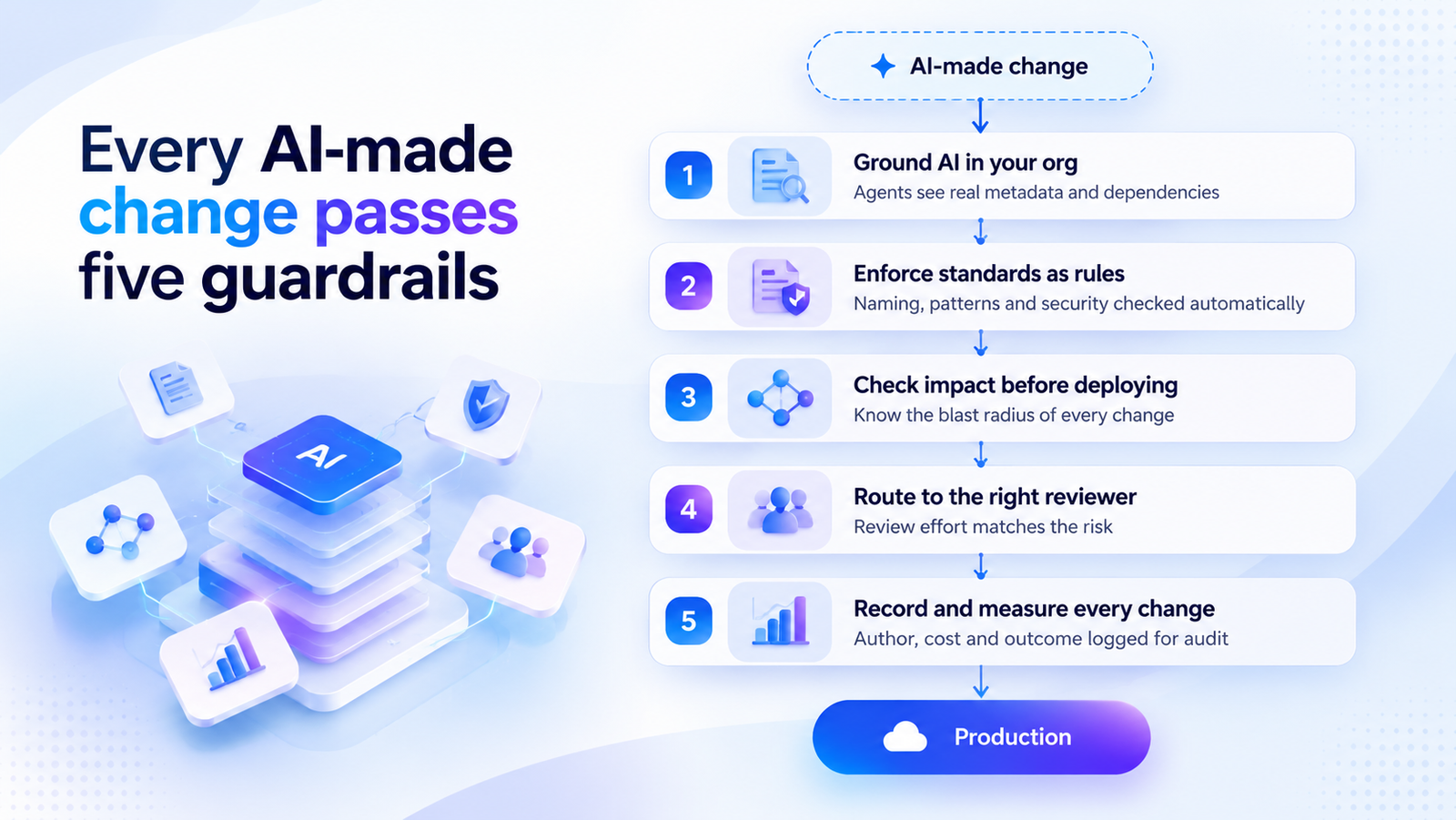
1. Ground AI in your org, not the internet
Most bad AI output in Salesforce comes from missing context, not bad models. An assistant that can't see your objects, fields and existing logic will guess. Make org-aware context the default for every AI tool your teams use, so suggestions start from what's actually there. We explain why in What Is Graph RAG.
2. Turn standards into rules, not wiki pages
Nobody reads the coding standards page, and AI certainly doesn't. Encode naming conventions, trigger patterns, FLS checks and test expectations as automated checks that run on every change, whoever or whatever wrote it. Our Apex best practices guide covers which ones matter most.
3. Check impact before anything deploys
AI can write a working change in seconds. It can't tell you that the field it touched feeds a finance report and two integrations. Make an impact check part of every change, not just the big ones. Here's how to run Salesforce impact analysis step by step.
4. Route each change to the right reviewer
If every change needs the same senior architect's sign-off, your CoE becomes a bottleneck overnight. Tier your reviews by risk instead (more on that below).
5. Record and measure every change
A mature CoE measures outcomes, not just output. How much did that AI-generated feature cost in tokens? Did it pass first time? Did it cause incidents? If you can't answer those, read Everyone's Adding AI Agents. Is Yours Actually Working?
A simple review model for AI-made changes
Here's the mindset shift that saves most CoEs: decide how much review a change needs by what it touches, not by who wrote it. A label change written by AI is still a label change. A permission set change written by your most senior developer still deserves a second pair of eyes.
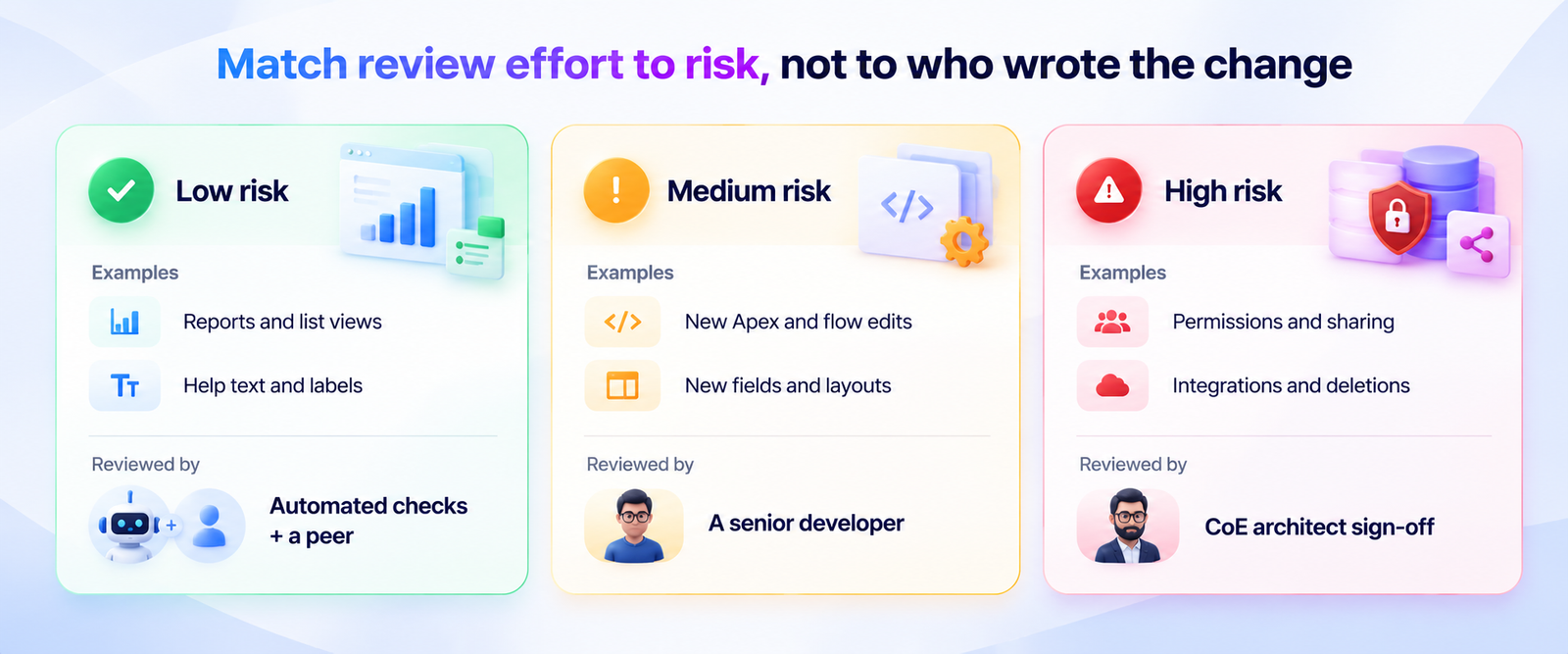
Treat these tiers as a starting point and adjust them to your org. The point is that reviewers spend their time where the risk actually is, and low-risk work keeps flowing. That only works, though, if you can tell quickly which tier a change belongs to, which brings us back to visibility.
How nCoder.ai helps a Salesforce CoE govern AI
We built nCoder.ai for exactly this moment. It connects to your org, maps every object, field, Apex class, flow and permission into Org 360, a living knowledge graph, and puts governance around the AI that works on top of it. Here's how it lines up with the five guardrails:
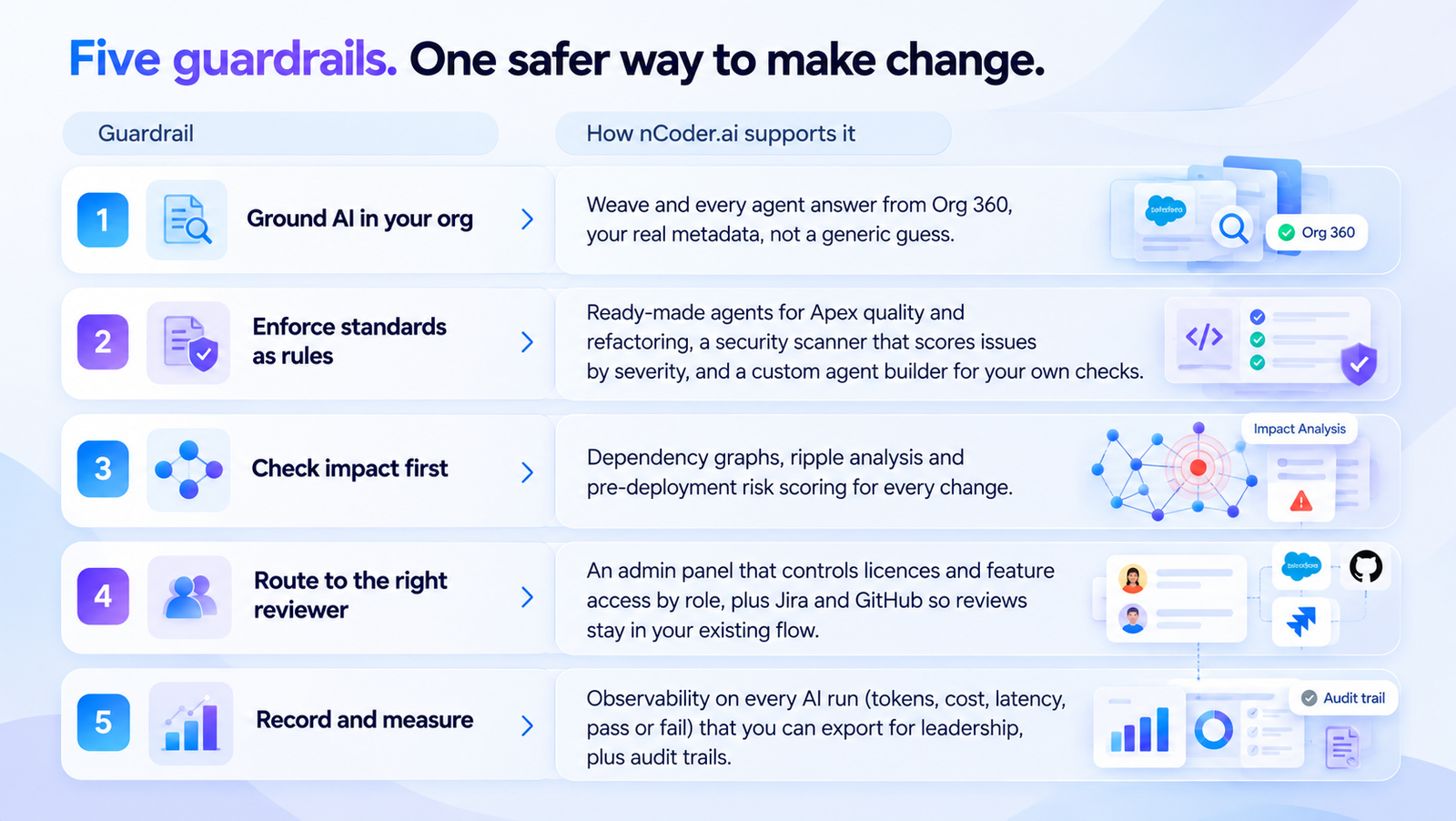
And because rolling out AI governance is as much about people as tools, every nCoder.ai plan comes with a Forward Deployed Engineer who works alongside your CoE to set it up around how your team actually works.
FAQs
What is a Salesforce Center of Excellence? It's the team that governs how your Salesforce org grows: standards, change approvals, release planning, risk and enablement. In the AI era, it also governs how AI tools are used on the org.
Should AI-generated Salesforce code be reviewed differently? Not more leniently. The most mature teams hold AI and human changes to the same standard. What changes is how you scale that review, through automated checks and risk-based tiers.
Who should be part of a Salesforce CoE today? An executive sponsor, a lead architect, admin and developer leads, someone from security, and now an owner for AI tooling, usage and cost.
How does nCoder.ai help a Salesforce CoE? It gives the CoE one place to see the whole org, check the impact of every change, control who can use which AI features, and measure what AI is actually costing and delivering.
Conclusion
Back to that Monday change review. The answer isn't to ban AI from the list, and it isn't to wave every AI-written change through either. It's to give your Salesforce Center of Excellence what it has always needed, just at a new scale: clear visibility into the org, standards that enforce themselves, review effort that matches the risk, and numbers that show what's working. AI will keep writing more of your changes. With the right guardrails, your CoE can stay the reason those changes are safe.
Give your CoE the visibility AI needs
nCoder.ai brings org-aware AI and governance into one platform, so your Center of Excellence can say yes to AI without losing control.
- See every dependency in your org through Org 360
- Check the impact of any change before it ships
- Control AI access by role and track cost and quality for every run
- Get a Forward Deployed Engineer to set it up with your team
Request a demo to see how it fits your CoE.