What Replaces Salesforce Optimizer? A Practical Org Audit Guide for 2027
Introduction
For years, Salesforce Optimizer was the free health check admins ran before a big release. One click, one report, and you knew which fields nobody used and which automations were about to cause trouble. That report is gone. Your org, however, kept growing: more flows, more Apex, more permission sets, and more people asking AI tools to change things they don't fully understand.
If you're searching for a Salesforce Optimizer alternative, you're really asking a bigger question: how do you run a reliable Salesforce org audit when the built-in tool no longer exists? This guide gives you a practical 7-step framework you can use heading into 2027, and shows how nCoder.ai turns it from a weeks-long manual project into a repeatable, AI-powered process.
Salesforce Optimizer is retired. What happened?
Salesforce built Optimizer to help customers move to Lightning Experience. With that job largely done, it was switched off in stages (Trailblazer Community notice):
- Orgs created after August 4, 2025 never had access.
- Hyperforce orgs lost Optimizer with the Winter '26 release.
- Non-Hyperforce orgs kept only the Hard-Coded URL report, then lost the app entirely in Summer '26.
The most common free replacement is Org Check, an open-source Salesforce Labs app focused on org health and technical debt. It's a solid starting point. But a modern Salesforce org health check needs more than a list of findings. It needs to know how everything connects. That's the gap nCoder.ai was built to fill.
Why your org still needs a regular health check
Optimizer disappeared, but the problems it flagged did not. Every year an org runs, it collects quick fixes, abandoned fields and automation nobody remembers building. Most of that Salesforce technical debt stays invisible until a release fails.
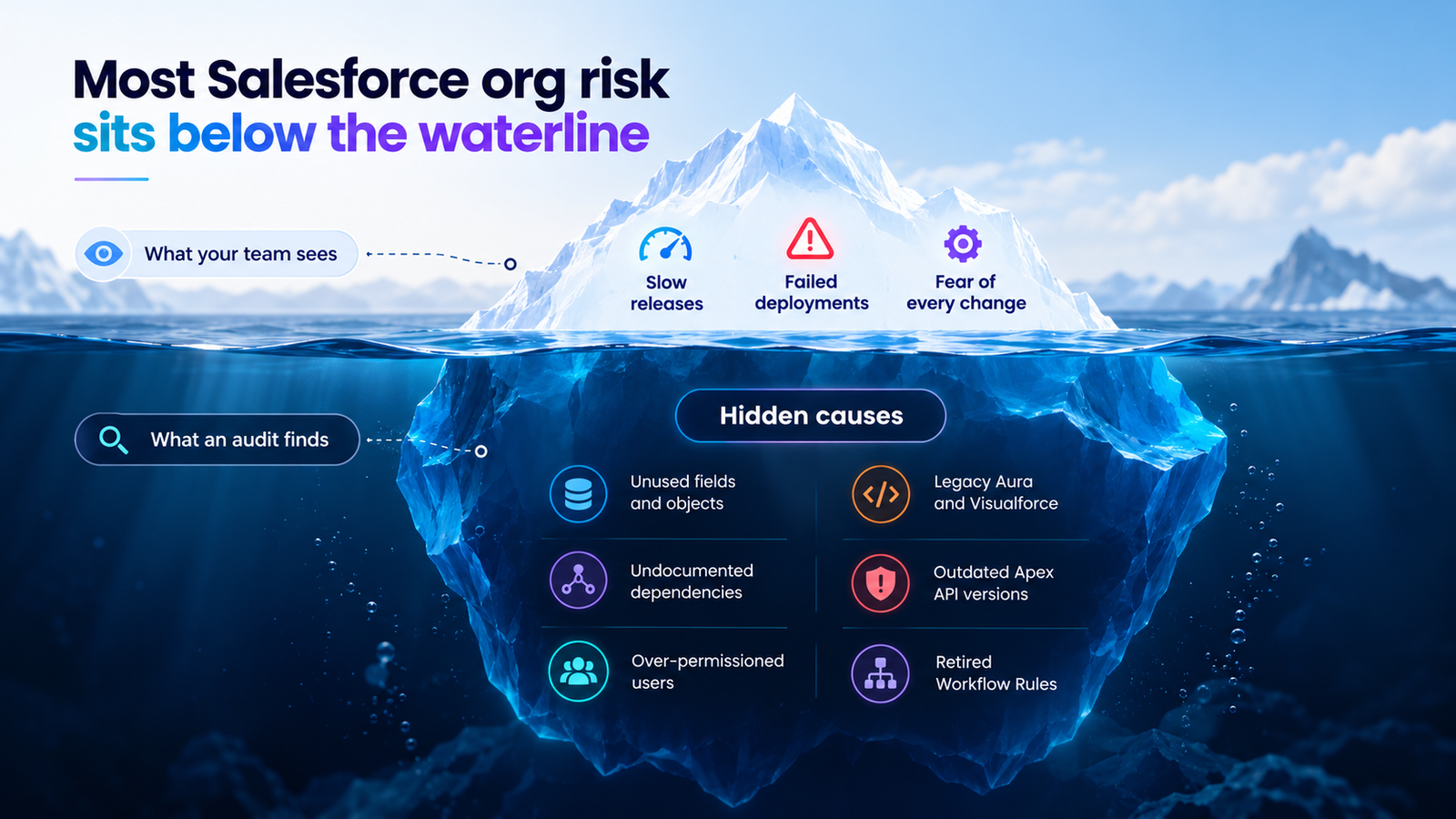
The symptoms are what your team feels. The causes are what an audit finds. Heading into 2027 the stakes are higher, because AI agents and coding assistants now make changes too. An agent working on an org it can't see clearly will repeat the same mistakes, only faster. (We covered this in The Blind Spot in Your Salesforce AI Agents.)
This is the problem nCoder.ai solves. It maps your entire org (every object, field, Apex class, flow, LWC component and permission) into a knowledge graph called Org 360. Instead of a one-time report, you get a living picture of your org that both your team and AI agents can reason over.
How to audit your Salesforce org in 7 steps
Optimizer gave you a one-off report. A better approach is a repeatable cycle you run every quarter and before every major release.
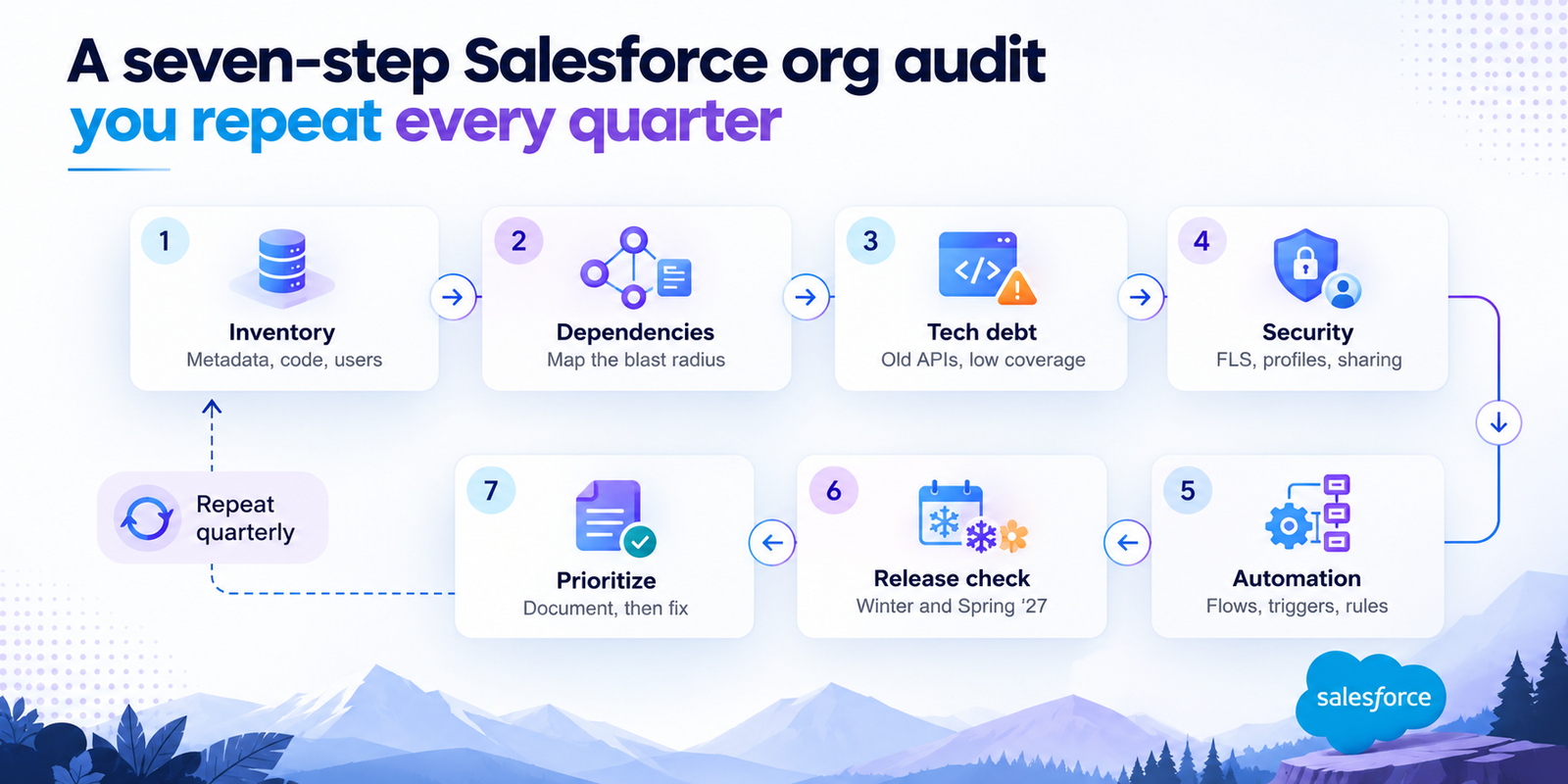
1. Inventory your metadata
Count what exists: objects, fields, Apex classes, triggers, flows, LWC and Aura components, profiles and permission sets. Flag unused fields (custom fields with no data) and components nobody has touched in years. This baseline drives every later step.
With nCoder.ai: sign in with Salesforce OAuth, so no new credentials are created. nCoder downloads your metadata (about 5 minutes for a young org, about 45 minutes for a 20-year-old one) and indexes it into Org 360. Production, sandbox and dev orgs can all be connected and switched between.
2. Map your dependencies
Before you delete or change anything, find out what depends on it. Salesforce's "Where is this used?" button helps for one field at a time. For whole-org Salesforce metadata analysis, a dependency graph shows the full blast radius across Apex, flows, layouts and permissions.
With nCoder.ai: Org 360 turns Salesforce dependency analysis into a single click. Open any field, class or flow to see its references, dependencies and blast radius. Or ask Weave, nCoder's chat workspace, "What breaks if I change this field?" The answer comes from your own org graph, not a guess.
3. Find technical debt
Look for Apex on outdated API versions, classes with low test coverage, monolith triggers and legacy Aura or Visualforce pages. Our Salesforce Modernization guide explains how to plan the cleanup.
With nCoder.ai: auto-generated docs include code metrics for every class. Ready-made agents such as Apex quality fix and refactor clean up code, and migration templates handle Aura to LWC, Visualforce to LWC and dead-code cleanup.
4. Run a Salesforce security audit
Review profiles, permission sets, sharing rules and field-level security. In Apex, check for SOQL injection and missing FLS checks, which we break down in SOQL Injection, FLS Violations, and the Risks Most Teams Don't Know They Have.
With nCoder.ai: the security scanner scores your org's vulnerabilities by severity. Click Let's Weave on any finding and nCoder drafts the fix, while the permission audit agent reviews who can access what.
5. Review automation
List every flow, trigger and remaining Workflow Rule or Process Builder. Salesforce no longer supports the last two, so migrate them to Flow. Watch for multiple automations firing on the same object.
With nCoder.ai: Org 360 shows every flow, trigger and Apex class acting on an object in one view, so overlapping automation is easy to spot before it reaches production.
6. Check release readiness
Compare your org against upcoming changes. For example, Salesforce to Salesforce is retiring in Spring '27 (PTC release assessment). See Winter '27 Is Rolling Out. What Will It Break in Your Org? for the current release.
With nCoder.ai: upload the Salesforce release notes PDF and the Salesforce Releases feature maps each change against your org as Breaking, Deprecated, Review or Improvement.
7. Document and prioritize
Record findings in one place, rank them by risk and effort, and assign owners. Documentation that refreshes with your metadata keeps the next audit fast; see Is AI-Generated Org Documentation Actually Reliable?
With nCoder.ai: plain-English documentation, class diagrams and code metrics regenerate every time metadata refreshes, and can be pushed to SharePoint. Fixes flow through Git and tools like Jira, then deploy straight to Salesforce. Schedule metadata refreshes and security scans, and your next audit is already half done.
Choosing a Salesforce Optimizer alternative: three approaches
There's no single right tool. The right choice depends on your org's age and how often you ship.
Many teams combine them: a free scan for quick wins, and an org-aware AI platform for the complex, high-risk work.
How nCoder.ai runs your Salesforce org audit
nCoder.ai is an AI workspace built only for Salesforce teams. Instead of scanning your org once, it keeps a live model of it.
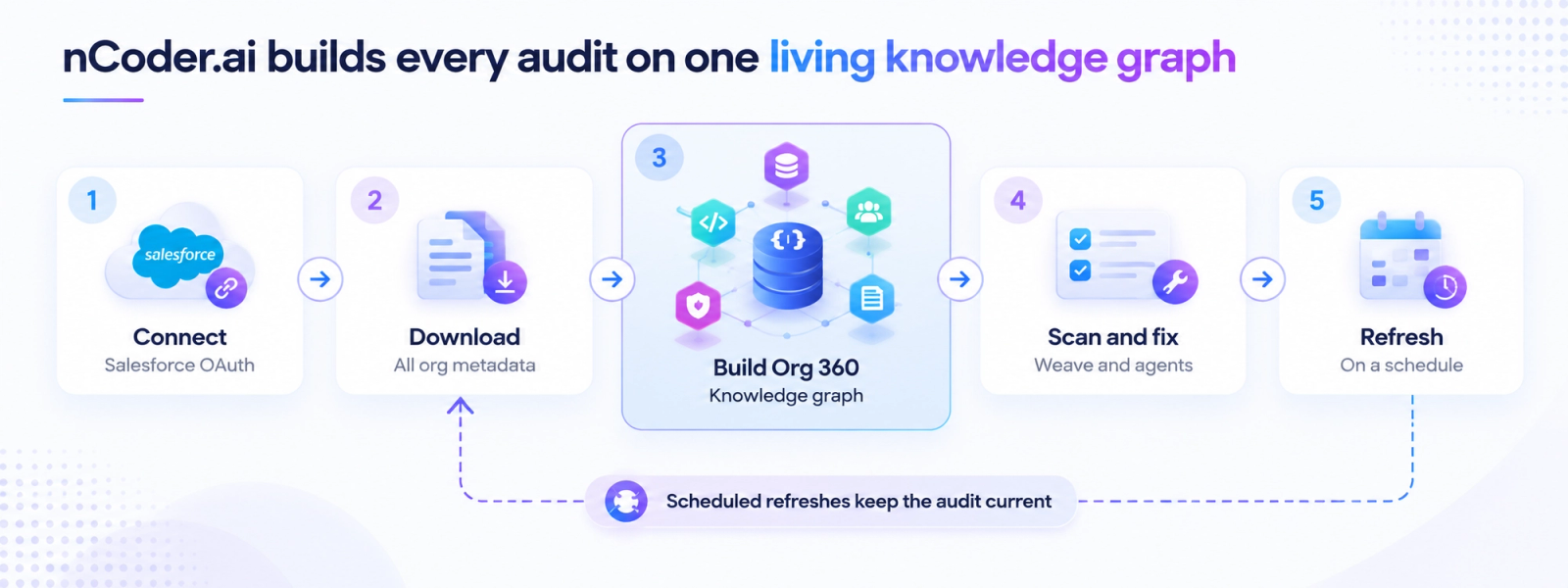
Two things set it apart. General AI coding tools are "org-blind": they don't know your objects, fields or code, so they guess. And Agentforce works on your Salesforce data, while nCoder works on the metadata and code layer, so the two complement each other. Developers, admins, architects and QA leads all work from the same Org 360 graph, which means an audit finding can go from discovery to fix to deployment in one place.
FAQs
Is Salesforce Optimizer still available? No. It was retired for Hyperforce orgs in Winter '26, and all remaining orgs lost access in Summer '26.
What is the best Salesforce Optimizer alternative? For a free scan, Org Check is the most common choice. For large orgs that need dependency mapping, security analysis and fixes, an AI org intelligence platform like nCoder.ai goes further.
How does nCoder.ai audit a Salesforce org? It connects through Salesforce OAuth, downloads your metadata and builds Org 360, a knowledge graph of every component and dependency. From there you run security scans, ask Weave about impact, generate documentation and fix issues with ready-made agents.
How often should I audit my Salesforce org? At least quarterly, and always before a major Salesforce release or a large deployment.
Can AI audit a Salesforce org accurately? Yes, if it's grounded in your actual metadata. Generic AI tools guess; tools that map your org first answer from what's really there. Read more in What Is Graph RAG.
Conclusion
Salesforce Optimizer's retirement didn't make org audits optional. It made them your responsibility. A modern Salesforce org audit covers far more than Optimizer ever did: dependencies, security, automation, release readiness and documentation. nCoder.ai brings all seven steps into one platform, grounded in your own metadata, so the audit stops being a yearly fire drill and becomes something your org simply has. That's what a real Salesforce Optimizer alternative looks like heading into 2027.
See your whole org in minutes, not weeks
nCoder.ai connects to your Salesforce org through OAuth, maps every object, field, flow, Apex class and permission into one knowledge graph, and shows you what to fix first. No spreadsheets. No guesswork.
- Find unused metadata and technical debt automatically
- See the blast radius of any change before you deploy
- Catch security gaps such as FLS violations and over-permissioned users
- Keep documentation current with every metadata refresh
Book a call or request a demo to run your first AI-powered org audit.